Filings
To get started import from edgar and use the get_filings function.
from edgar import *

filings = get_filings()
This gets the list of filings for the current year and quarter into a Filings object.
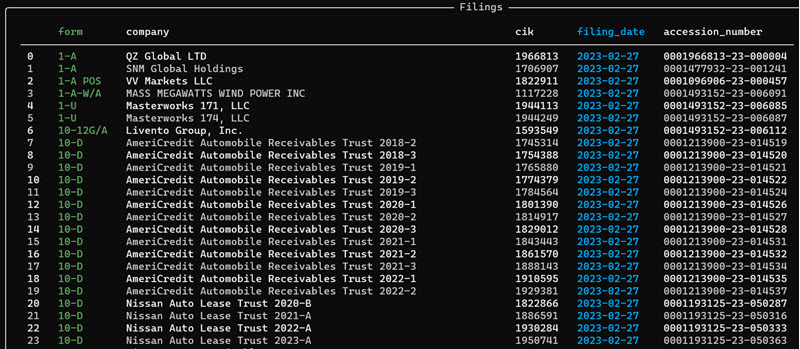
If you need a different date range you can specify a year or years and a quarter or quarters. These are valid ways to specify the date range or filter by form or by filing date.
    >>> filings = get_filings(2021) # Get filings for 2021

    >>> filings = get_filings(2021, 4) # Get filings for 2021 Q4

    >>> filings = get_filings(2021, [3,4]) # Get filings for 2021 Q3 and Q4

    >>> filings = get_filings([2020, 2021]) # Get filings for 2020 and 2021

    >>> filings = get_filings([2020, 2021], 4) # Get filings for Q4 of 2020 and 2021

    >>> filings = get_filings(range(2010, 2021)) # Get filings between 2010 and 2021 - does not include 2021

    >>> filings = get_filings(2021, 4, form="D") # Get filings for 2021 Q4 for form D

    >>> filings = get_filings(2021, 4, filing_date="2021-10-01") # Get filings for 2021 Q4 on "2021-10-01"

    >>> filings = get_filings(2021, 4, filing_date="2021-10-01:2021-10-10") # Get filings for 2021 Q4 between
                                                                            # "2021-10-01" and "2021-10-10"
Convert the filings to a pandas dataframe
The filings data is stored in the Filings class as a pyarrow.Table. You can get the data as a pandas dataframe using
to_pandas
df = filings.to_pandas()
Navigating filings
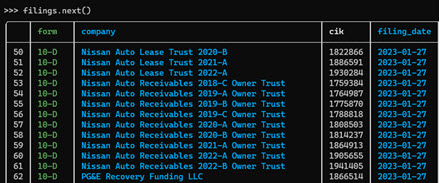
The Filings object allows you to navigate through filings using filings.next() and filings.prev().
This shows you pages of the data - the page size is about 50.
# To see the next page of data
filings.next()

# To see the previous page
filings.previous()

# To see the current page
filings.current()
Getting the latest filings
You can get the latest n filings by filing_date from a filings using filings.latest().
If you provide the parameter n it will return the latest n filings.
filing = filings.latest(n=5)
filing
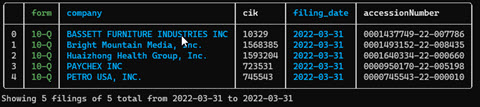
If you omit this parameter, or set n=1 it will return a single `Filings object.
filing = filings.latest()
filing

Filtering filings
You can filter the filings object using te filter() function. This allows you to filter
by filing date, or by form.
Filtering filings by date
To filter by filing date specify the filing date in YYYY-MM-DD format e.g. 2022-01-24
(Note the parameters date and filing_date are equivalent aliases for each other)
filings.filter(date="2021-01-24") # or filings.filter(filing_date="2021-01-24")
You can specify a filing date range using the colon
filings.filter(date="2021-01-12:2021-02-28")
To filter by dates before a specified date use `:YYYY-MM-DD'
filings.filter(date=":2021-02-28")
To filter by dates after a specified date use `YYYY-MM-DD:'
filings.filter(date="2021-02-28:")
Filtering filings by form
You can filter filings by form using the form parameter.
filings.filter(form="10-K")
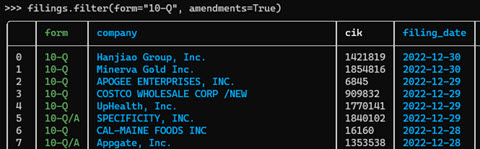
To filter by form e.g. 10-K and include form amendments use amendments = True.
filings.filter(form="10-K", amendments=True)
Getting a single filing
You can get a single filing from the filings using the bracket operator [],
specifying the index of the filing. The index is the value displayed in the leftmost
position in the filings table. For example, to get the 10-Q for Costco in the table above
use filings[3]
filing = filings[3]

View the filing homepage
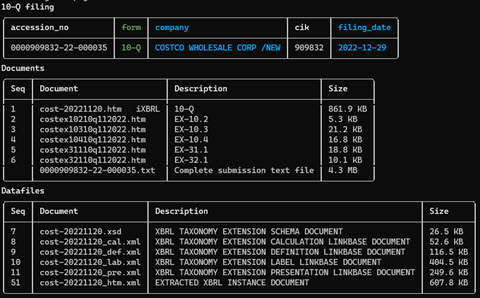
You can view the filing homepage in the terminal using filing.homepage
This gives you access to the FilingHomepage class that you can use to list all the documents
and datafiles on the filing.
filing.homepage
Open a filing
You can open the filing in your browser using filing.open(). This will work on environments with access to the browser,
will probably not work on a remote server.
filing.open()
Open the Filing Homepage
You can open the filing homepage in the browser using filing.homepage.open().
filing.homepage.open()
View the filing as Markdown
You can view the filing's HTML content as markdown in the console using view(). It works for all filing types
but can be a little slow for filings with large HTML files
filing.view()
Get the filing's html
You can get the html content of the filing using.html()
filing.html()
Get the filing's html as Markdown
You can get the html content as markdown using.markdown()
filing.markdown()
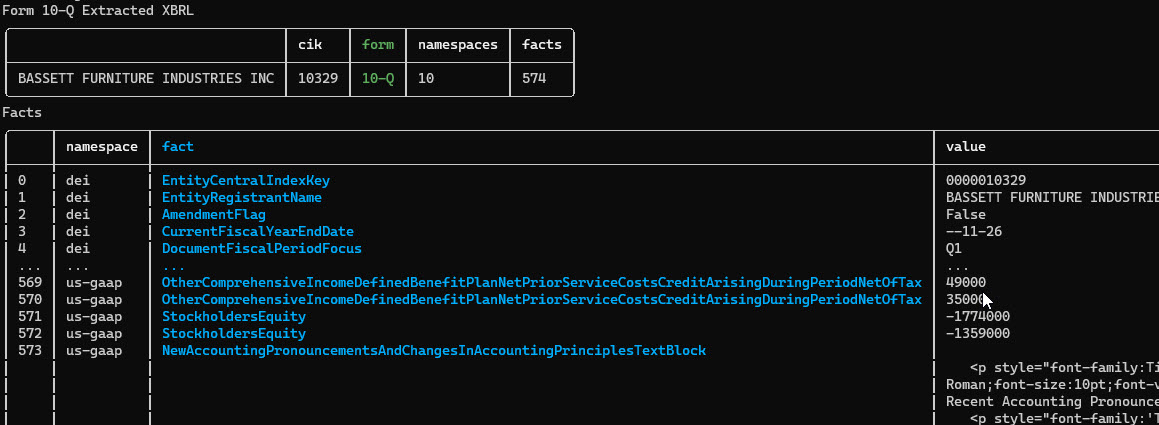
Working with XBRL filings
Some filings are in XBRL (eXtensible Business Markup Language) format. These are mainly the newer filings, as the SEC has started requiring this for newer filings.
If a filing is in XBRL format then it opens up a lot more ways to get structured data about that specific filing and also about the company referred to in that filing.
The Filing class has an xbrl function that will download, parse and structure the filing's XBRL document if one exists.
If it does not exist, then filing.xbrl() will return None.
The function filing.xbrl() returns a FilingXbrl instance, which wraps the data, and provides convenient
ways of working with the xbrl data.
filing_xbrl = filing.xbrl()